Flash! Aah-aah!
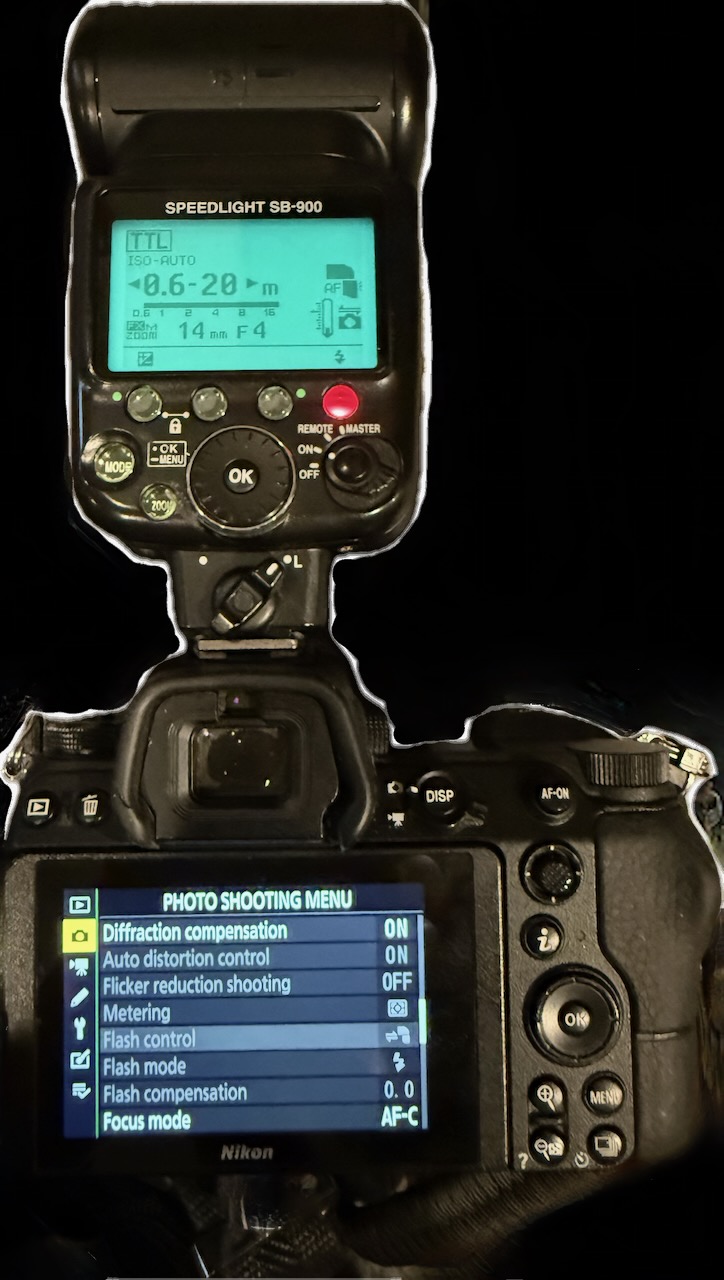
One of the things I like about my main camera, a Nikon Z6, is the fact that it doesn’t have a built-in flash mechanism.
You know how lots of photos with cheap point-n-shoot cameras give people spooky red “zombie eyes”? You know why that happens, right? It’s a simple trigonometry problem: there’s an isosceles triangle formed by the flash, the back of the eyeballs of the people in the photo, and the camera lens. Why the back of the eyeball? Because light from the lens enters the eye through the pupil — the dark bit at the center — bounces off the back of the sphere of the eye, then comes back out the pupil again and back toward the camera lens. Since an average pupil in dim light is typically 3-8 millimeters, and the interior of the eye is around 24 millimeters, this ends up meaning that if the triangle extended outward from those dimensions has a small enough base, then the light from the flashbulb is illuminating the blood vessels on the back of the eye, and that’s why the eyes have that red zombie effect. (This is also why modern cameras, including phone cameras, will “pulse” the flash a few times before taking the photo: this causes people to squint a little bit, making the pupil smaller, and reducing the probability of hitting the redeye problem.)
I digress. TLDR for the most part I’d rather take photos with no flash than to use the flash built in with the camera.
Sometimes, having flash is good. A good quality external flash produces a lot more light than a built-in flash ever could, and can make nighttime seem like daytime. And you can play around with this, by making the flash bounce off the ceiling for more naturalistic shadows. Or, with an aimable flash, you can do things like bounce the light off the wall — consider for example the cover photo for “With The Beatles”, where half the faces are clearly lit, and half are in deep shadow. That’s a neat trick, and can be fun to replicate.
So I have a flash, I just don’t use it very often, and because I don’t use it very often, I always seem to forget that the thing has a gazillion controls on it that 98% of the time I just leave at the defaults because I can’t be bothered to read the manual.
But I do need to use it sometimes.
Late last year, I was trying to get a family photo for the ol’ holiday card, so I took out the camera, the tripod, the flash, and started setting things up.
The flash wasn’t working.
Put in fresh batteries. Switched it off and on again. Confirmed it was turning on. Confirmed that I could press the “test” button to fire the flash. All the hardware seemed to be working.
One troubleshooting option was ridiculous enough to dismiss at once: contact Nikon tech support. Do they even have tech support? I dunno, maybe, but I didn’t want to deal with tracking down a phone number & sitting on hold for who knows how long, or sending an email and getting a respons hours or days later.
I did the unthinkable: I started reading the manual. Alas, it is a hundred pages long, and I had impatient people waiting to get started.
Remembering modernity, I tried searching the internet. Nikon’s website. StackExchange. Reddit posts. None of the search results were getting me anywhere.
In desperation, I noticed the Claude AI icon on the Dock. What the heck? It’s worth a try. I took a photo of the back of the camera + flash and uploaded it to Claude, showing that everything was “working”, but explained that the flash wasn’t firing when I try to take a photo.
Like any good tier one tech support agent, Claude had me review the basics. Make sure the hot shoe mount point is clean & the connection is secure. Review the camera mode settings. Review the camera’s flash control settings. Make sure the firmware is up to date. Try other modes. I’d tried most of this already, but in the spirit of rubber duck debugging, it was good to make sure that the basics had been checked.
Within 13 minutes, Claude made a suggestion that resolved the problem.
Old school film cameras were, of course, mechanical. You press the shutter button, and a physical aperture mechanism opens, exposing the film plane to light for a fraction of a second, as specified by the camera’s current shutter speed setting. Even today, people recognize the “kerchunk” sound of a clicking camera shutter.
Modern digital cameras don’t necessarily have a physical shutter anymore, as this action is controlled by software. When you press the shutter button to take a photo, a little speaker in the camera either plays an MP3 file of that “kerchunk” sound, or it just makes a beep noise.
I find that noise annoying & distracting, and since the Nikon Z cameras offer a setting for “silent photography”, I set my camera to take photos silently.
Turns out, the firmware has an intentional design feature to disable the flash when silent photography is enabled.
Never in a million years would it have occurred to me that these settings would interact in this way. None of my web searches were turning up this connection, nothing I was seeing in the manual had pointed this out. To be sure, now that I’m aware of this, I’m sure that I could find the right page in the manual, or the right StackExchange discussion, to explain this, but it doesn’t matter now.
Claude, which I had never talked to about photography before this, figured it out within 13 minutes.
Will Claude save every one of us? Aah-aah …maybe not. But it saved the day that day!